%22%2F%3E%20%3Cpath%20d%3D%22M24%2C16%20L104%2C16%20L104%2C65%20C104%2C91.95%2088.8%2C105.18%2064%2C114%20C39.2%2C105.18%2024%2C91.95%2024%2C65%20Z%22%20fill%3D%22%23f4f6f9%22%2F%3E%20%3Cpath%20d%3D%22M29%2C21%20L99%2C21%20L99%2C64%20C99%2C87.65%2085.7%2C99.26%2064%2C107%20C42.3%2C99.26%2029%2C87.65%2029%2C64%20Z%22%20fill%3D%22url(%23tpS)%22%2F%3E%20%3Cpath%20d%3D%22M44%2C44%20H84%20V58%20H71%20V96%20H57%20V58%20H44%20Z%22%20fill%3D%22%23f4f6f9%22%2F%3E%20%3C%2Fsvg%3E) Trump PDF
Trump PDFTrump PDF › Highlight
🔒 Files never leave your deviceHighlight PDF Online — Free Text Highlighter
Mark up a PDF the way you would with a real highlighter pen. Drag across any passage to lay down translucent colour, pick the shade you want, and export a document with the highlights baked in.
Free · no signup · no watermark · no file uploaded
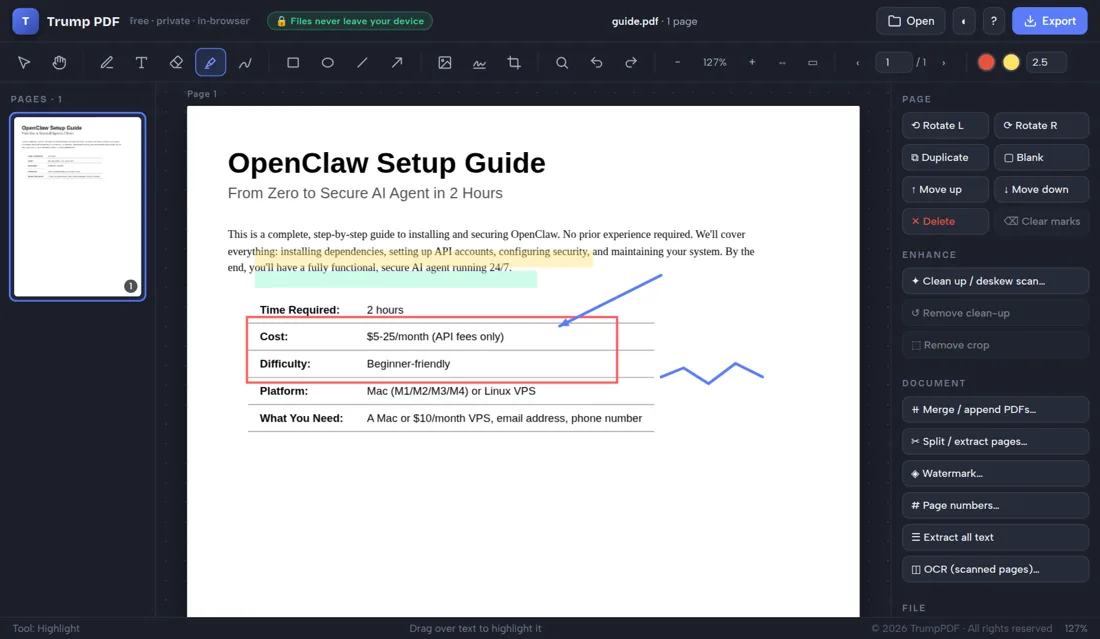
How to highlight a PDF
- Open the editor and choose your PDF.
- Select the highlighter tool from the toolbar.
- Pick a highlight colour from the swatch.
- Drag across the text you want to highlight.
- Click Export to save the highlighted PDF.
Highlight text in any PDF, in any colour
Select the highlighter, choose a colour from the swatch, then drag a rectangle over the words you want to mark. The colour is translucent, so the text underneath stays perfectly readable. Different colours for different themes — yellow for key facts, pink for problems, green for approvals — is a fast way to make a long document reviewable.
Works on scans as well as text PDFs
Because highlights are drawn over the page rather than tied to a text layer, they work on scanned documents too. That matters: most highlighter tools silently fail on scans because there is no selectable text to attach to.
Annotate, then adjust
Every highlight stays editable while you work. Select one to move it, resize it with the handles, or delete it with a keypress. Undo and redo cover every change, and Clear marks strips all annotations from a page if you want to start over.
Mark up confidential documents privately
Highlighting usually means reviewing something sensitive — a contract, a case file, a set of exam answers, a medical report. Uploading those to a free annotation site is a poor trade. Here the marking happens entirely in your browser.
Why "no upload" matters when you highlight a PDF
People usually reach for this tool while marking up a contract, a case file or a report for review. Nearly every free PDF website handles that by uploading your file to a server, processing it there and deleting it at some later point you cannot verify — which means the document you are reviewing has been copied onto infrastructure belonging to a company you know nothing about, together with your IP address and the file name.
Trump PDF takes the upload out of the equation. The whole editor is a single page of code that runs in your browser, and every operation — editing text, compressing, merging, OCR, export — happens on your own processor. You do not have to take our word for it: open your browser's developer tools, switch to the Network tab, and use the editor. You will see requests that download the application, and no request that sends your document anywhere.
Frequently asked questions
Can I highlight a scanned PDF?
Yes. Highlights are drawn over the page, so they work whether or not the document has a selectable text layer.
Can I change the highlight colour?
Yes. Pick any colour before drawing, and you can select an existing highlight and recolour it.
Will the highlights be visible to everyone?
Yes. They are written into the exported PDF and appear in any viewer, and they print.
Is the document uploaded to highlight it?
No. All annotation happens locally in your browser.