%22%2F%3E%20%3Cpath%20d%3D%22M24%2C16%20L104%2C16%20L104%2C65%20C104%2C91.95%2088.8%2C105.18%2064%2C114%20C39.2%2C105.18%2024%2C91.95%2024%2C65%20Z%22%20fill%3D%22%23f4f6f9%22%2F%3E%20%3Cpath%20d%3D%22M29%2C21%20L99%2C21%20L99%2C64%20C99%2C87.65%2085.7%2C99.26%2064%2C107%20C42.3%2C99.26%2029%2C87.65%2029%2C64%20Z%22%20fill%3D%22url(%23tpS)%22%2F%3E%20%3Cpath%20d%3D%22M44%2C44%20H84%20V58%20H71%20V96%20H57%20V58%20H44%20Z%22%20fill%3D%22%23f4f6f9%22%2F%3E%20%3C%2Fsvg%3E) Trump PDF
Trump PDFTrump PDF › Annotate
🔒 Files never leave your deviceAnnotate PDF Online — Draw, Type and Mark Up
A full annotation set in one place: freehand pen, arrows, lines, rectangles, ellipses, highlights, text notes and whiteout. Mark up a draft, sketch a correction, circle a figure or point at a paragraph — then export a PDF anyone can open.
Free · no signup · no watermark · no file uploaded
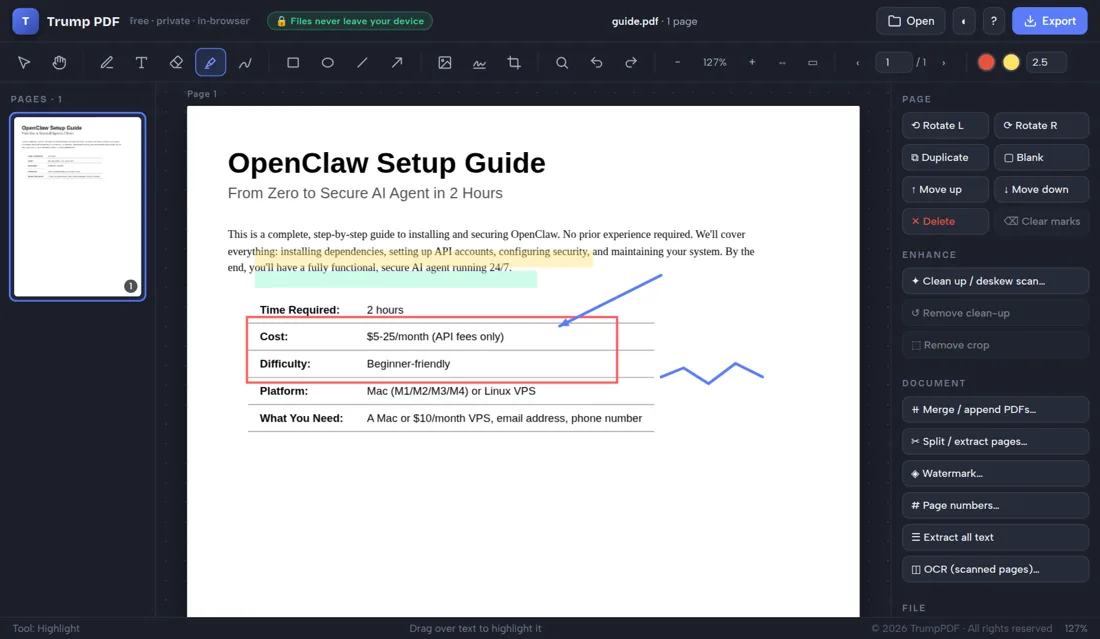
How to annotate a PDF
- Open the editor and choose the PDF you want to mark up.
- Pick a tool: pen, arrow, box, highlight or text.
- Set the colour and stroke width, then draw on the page.
- Select any annotation to move, resize or delete it.
- Click Export to save the annotated PDF.
Every markup tool you actually need
The pen draws smooth freehand strokes for circling and ticking. Arrows and lines point at specifics. Rectangles and ellipses frame regions. The highlighter marks passages. Text boxes add typed comments in any font, size and colour. Whiteout covers anything that should disappear. Stroke width and colour are adjustable for all of them.
Annotations stay editable until you export
Nothing is committed until you save. Select any mark to move, resize or delete it, copy and paste marks between pages, nudge them with arrow keys, and step backwards through your whole session with Ctrl+Z. Clear marks removes everything on a page in one action.
Review documents on a tablet or phone
Drawing works with a finger or stylus, so a tablet becomes a review surface for marking up drafts, plans and drawings. The layout adapts to small screens and pinch-zoom lets you annotate precisely.
Comment on sensitive drafts without uploading them
Annotation is a review activity, and reviews usually happen on documents that are not public yet — contracts, designs, manuscripts, medical or legal files. Every mark you make here is applied on your own device.
Why "no upload" matters when you annotate a PDF
People usually reach for this tool while commenting on an unreleased draft, a design or a manuscript. Nearly every free PDF website handles that by uploading your file to a server, processing it there and deleting it at some later point you cannot verify — which means the draft you are reviewing has been copied onto infrastructure belonging to a company you know nothing about, together with your IP address and the file name.
Trump PDF takes the upload out of the equation. The whole editor is a single page of code that runs in your browser, and every operation — editing text, compressing, merging, OCR, export — happens on your own processor. You do not have to take our word for it: open your browser's developer tools, switch to the Network tab, and use the editor. You will see requests that download the application, and no request that sends your document anywhere.
Frequently asked questions
Can I draw freehand on a PDF?
Yes. The pen tool draws smooth freehand strokes with adjustable colour and thickness, using a mouse, trackpad, finger or stylus.
Can I add typed comments?
Yes. Place a text box anywhere and type into it, with control over font, size, colour and alignment.
Can I remove an annotation after adding it?
Yes. Select it and press Delete, or use Ctrl+Z to undo. Clear marks removes every annotation on the page.
Do annotations upload my file?
No. All annotation happens in your browser.