%22%2F%3E%20%3Cpath%20d%3D%22M24%2C16%20L104%2C16%20L104%2C65%20C104%2C91.95%2088.8%2C105.18%2064%2C114%20C39.2%2C105.18%2024%2C91.95%2024%2C65%20Z%22%20fill%3D%22%23f4f6f9%22%2F%3E%20%3Cpath%20d%3D%22M29%2C21%20L99%2C21%20L99%2C64%20C99%2C87.65%2085.7%2C99.26%2064%2C107%20C42.3%2C99.26%2029%2C87.65%2029%2C64%20Z%22%20fill%3D%22url(%23tpS)%22%2F%3E%20%3Cpath%20d%3D%22M44%2C44%20H84%20V58%20H71%20V96%20H57%20V58%20H44%20Z%22%20fill%3D%22%23f4f6f9%22%2F%3E%20%3C%2Fsvg%3E) Trump PDF
Trump PDFTrump PDF › Add image
🔒 Files never leave your deviceAdd Picture to PDF Online — Free & Private
Insert an image into a PDF without handing the document to a server. Choose a photo, logo, stamp or scanned signature, click where it belongs, then drag and resize it until it sits exactly right.
Free · no signup · no watermark · no file uploaded
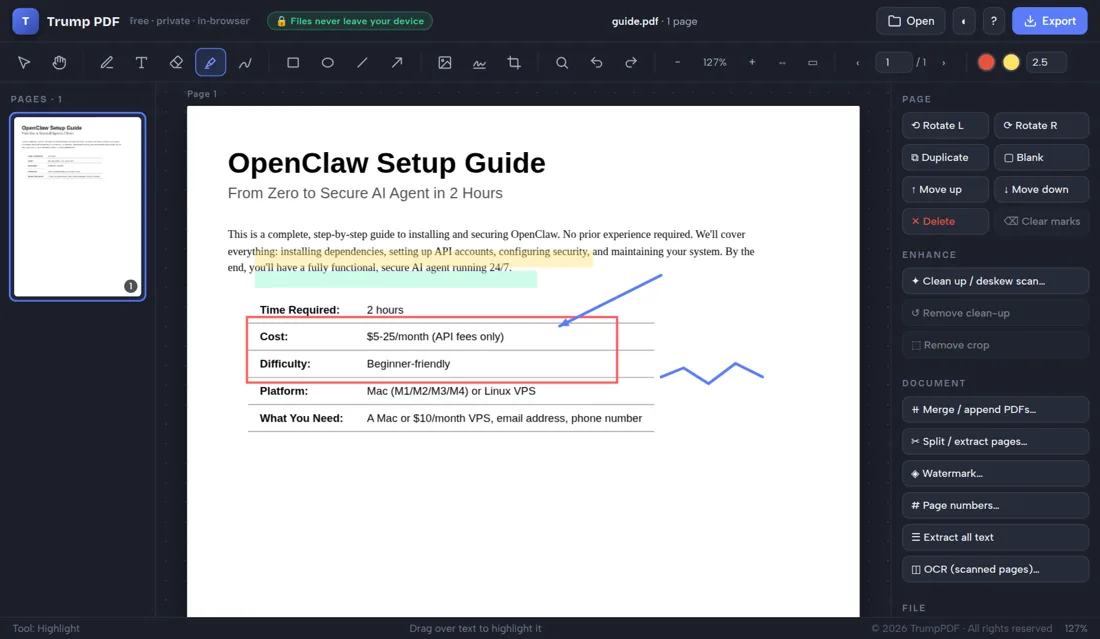
How to add image a PDF
- Open the editor and choose your PDF.
- Click the image button in the toolbar and pick a picture.
- Click the page where the image should be placed.
- Drag to reposition and use the corner handles to resize.
- Click Export to save the PDF with the image embedded.
How to insert images into PDF pages
Click the image button, pick a file from your device, then click the spot on the page where it should land. The picture arrives at a sensible size with its aspect ratio preserved, and you can drag it anywhere, pull the corner handles to resize, or nudge it a point at a time with the arrow keys for precise alignment against text or a table cell.
Supported image formats
PNG, JPG and WebP all work. PNG is the right choice for logos, stamps and signatures because it keeps transparent backgrounds, so your logo sits on the page instead of inside a white rectangle. JPG suits photographs. Whichever you embed, the exported PDF keeps the picture at full quality unless you deliberately compress the file afterwards.
Put a photo, logo or stamp on any page
Common jobs include adding a company logo to a letterhead, dropping a photo into a report, stamping PAID or APPROVED artwork onto an invoice, and placing a scanned signature image onto a contract. Copy an image with Ctrl+C and paste it onto other pages with Ctrl+V to repeat it through a document.
Embed images without uploading the document
Every other free tool that puts a picture on a PDF requires you to upload both the document and the image. Here both stay on your machine: the image is read locally, embedded locally, and written into the file you download.
Why "no upload" matters when you add image a PDF
People usually reach for this tool while adding a logo, a stamp or a scanned signature to a document. Nearly every free PDF website handles that by uploading your file to a server, processing it there and deleting it at some later point you cannot verify — which means both the document and the image you are inserting has been copied onto infrastructure belonging to a company you know nothing about, together with your IP address and the file name.
Trump PDF takes the upload out of the equation. The whole editor is a single page of code that runs in your browser, and every operation — editing text, compressing, merging, OCR, export — happens on your own processor. You do not have to take our word for it: open your browser's developer tools, switch to the Network tab, and use the editor. You will see requests that download the application, and no request that sends your document anywhere.
Frequently asked questions
How do I add a picture to a PDF for free?
Open your PDF in the editor, click the image button, choose your picture and click where it should go. There is no signup, no watermark and no upload.
Can I add a transparent PNG logo?
Yes. PNG transparency is preserved, so a logo or stamp sits cleanly on the page rather than inside a white box.
Can I put the same image on every page?
Yes. Place it once, copy it with Ctrl+C, then paste it onto each page with Ctrl+V.
Are my image and document uploaded anywhere?
No. Both are read and embedded inside your browser and never transmitted.