%22%2F%3E%20%3Cpath%20d%3D%22M24%2C16%20L104%2C16%20L104%2C65%20C104%2C91.95%2088.8%2C105.18%2064%2C114%20C39.2%2C105.18%2024%2C91.95%2024%2C65%20Z%22%20fill%3D%22%23f4f6f9%22%2F%3E%20%3Cpath%20d%3D%22M29%2C21%20L99%2C21%20L99%2C64%20C99%2C87.65%2085.7%2C99.26%2064%2C107%20C42.3%2C99.26%2029%2C87.65%2029%2C64%20Z%22%20fill%3D%22url(%23tpS)%22%2F%3E%20%3Cpath%20d%3D%22M44%2C44%20H84%20V58%20H71%20V96%20H57%20V58%20H44%20Z%22%20fill%3D%22%23f4f6f9%22%2F%3E%20%3C%2Fsvg%3E) Trump PDF
Trump PDFTrump PDF › Edit text
🔒 Files never leave your deviceEdit PDF Text Online — Without Uploading Anything
Most "PDF editors" only let you stamp a new text box on top of the page. Trump PDF edits the words that are already there: click any paragraph, type over it, and the paragraph reflows inside its own bounds with the original font, size, colour and letter-spacing matched automatically.
Free · no signup · no watermark · no file uploaded
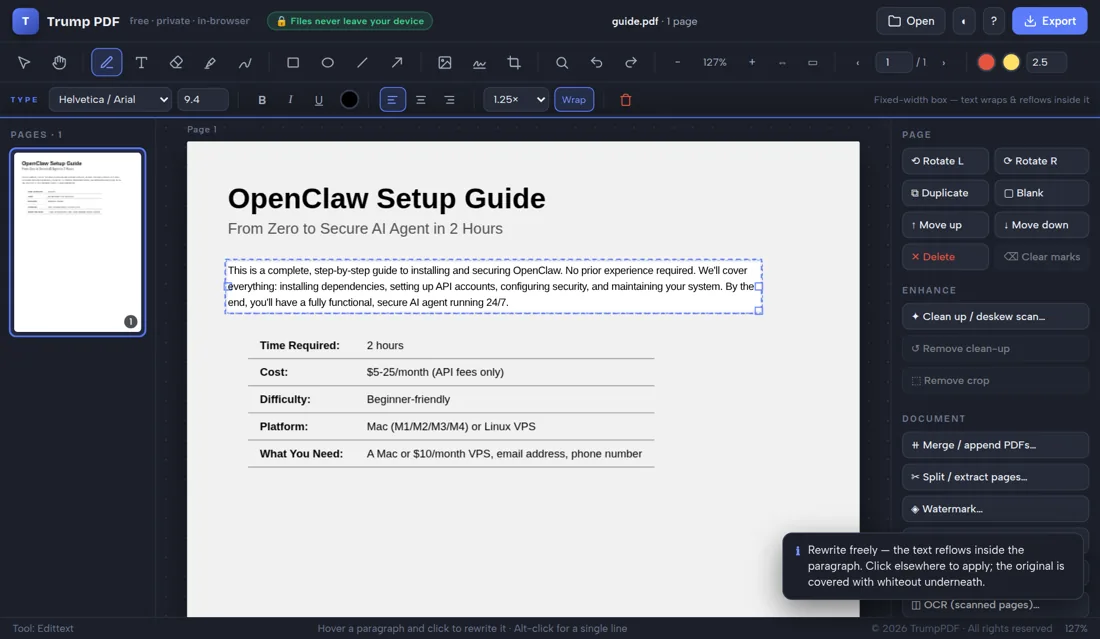
How to edit text a PDF
- Open the editor and choose your PDF (it stays on your device).
- Pick the Edit text tool, then hover a paragraph to see it outlined.
- Click the paragraph and rewrite it — the text reflows as you type.
- Adjust font, size, colour or spacing in the formatting bar if needed.
- Click Export and save your edited PDF.
How the paragraph editing works
When you click a block of text, the editor reads the real text layer of the PDF, measures every line, then works out the font family, weight, size, line height, alignment and even the tracking used by the original document. It masks the old text and drops an editable box in exactly the same position, sitting on exactly the same baseline. You type; the text wraps and re-flows as a paragraph rather than running off the edge of the page.
Change fonts, size, colour and spacing
A formatting bar appears whenever text is in play: font family, size, bold, italic, underline, colour, alignment (left, centre, right), line spacing, and a wrap toggle that switches a box between fixed-width reflow and auto-sizing. Keyboard shortcuts work as you would expect — Ctrl+B, Ctrl+I, Ctrl+U — and arrow keys nudge a box a point at a time, or ten points with Shift held.
Find and replace across every page
Press Ctrl+F to search the whole document, with match-case and whole-word options. Replace swaps the words on the page itself with styling matched to the surrounding line, so a replaced phrase does not look pasted in. This is the fastest way to fix a name, a date or a price that appears throughout a long contract.
When a PDF cannot be text-edited
If your file is a scan — a photograph of paper with no text layer — there is nothing to click. Run it through OCR first to recognise the words, or use whiteout plus a new text box to cover and retype a section. The editor tells you which case you are in rather than silently doing nothing.
Why "no upload" matters when you edit text a PDF
People usually reach for this tool while editing the wording of a contract, a lease or an offer letter. Nearly every free PDF website handles that by uploading your file to a server, processing it there and deleting it at some later point you cannot verify — which means the exact clauses you are rewriting has been copied onto infrastructure belonging to a company you know nothing about, together with your IP address and the file name.
Trump PDF takes the upload out of the equation. The whole editor is a single page of code that runs in your browser, and every operation — editing text, compressing, merging, OCR, export — happens on your own processor. You do not have to take our word for it: open your browser's developer tools, switch to the Network tab, and use the editor. You will see requests that download the application, and no request that sends your document anywhere.
Frequently asked questions
Can I really edit existing text in a PDF for free?
Yes. Click any paragraph and rewrite it. There is no signup, no watermark and no page limit, because the work happens on your own computer instead of on a paid server.
Will the font still match after I edit?
The editor detects the font family, weight, style, size, line height and letter-spacing of the original text and applies them to your replacement, so edits blend into the page.
Is my document uploaded anywhere?
No. The editor runs entirely in your browser. You can confirm it yourself: open your browser developer tools, watch the Network tab while you edit, and you will see no upload requests.
Can I edit a scanned PDF?
Not directly, because a scan has no text layer. Run OCR to recognise the text, or cover the old text with whiteout and type fresh text on top.